
Quick overview of Norman accounting software
- Norman’s interface is modern and easy to use. It has one-click shortcuts to create an invoice, submit a tax declaration, or upload a document.
- Norman is available in English, from its interface to its customer support.
- Norman’s AI chat answers support questions instantly. A command bar, triggered by a slash command, offers a “Smart Prompts” panel of ready-made queries.
- Norman’s free plan never expires and needs no credit card. Other accounting software we reviewed offers only 14 days of free access.
- Norman lets you route your books to a partner tax advisor for sign-off, with a one-business-day turnaround.
- Norman connects directly to ChatGPT, Claude, and Cursor. It also offers MCP, developer API, and more.
Verdict: Norman Finance is not perfect. However, if you are looking for free accounting software, Norman is the clear winner. We are also impressed by how quickly the team behind Norman Finance is shipping new features.
For freelancers, Accountable* is still our top pick. However, if Norman continues to build at this pace, they may dethrone Accountable from their top spot soon.
Read our complete comparison of the best accounting software in Germany here ->

GermanPedia
8.2 out of 10
Norman.Finance
08/2026
✅ Smart AI chat support
✅ E-invoicing (XRechnung, ZUGFeRD)
✅ Connects to ChatGPT, Claude, and Cursor
✅ Generoud free plan, no credit card required
The AI overview and answers are as good as the sources it uses.
To ensure you get AI answers from a deeply researched, maintained, and up-to-date source, add GermanPedia to your preferred sources.
How did we review Norman accounting software?
- We first identified the categories that are important for expats in Germany. For each category, we developed different parameters to score Norman.
- Norman received a score for each parameter. We combined the scores of those parameters to give a score to the category.
- Each category is weighted based on its importance.
- Lastly, we summed the weighted scores across all categories to obtain a final score.
The table below shows Norman’s performance across various categories and the overall score.
| Category | Weight | Score | Weighted Score |
|---|---|---|---|
| Ease of Setup & Onboarding | 20% | 9 | 1.8 |
| UI/UX | 20% | 6 | 1.2 |
| English support | 15% | 10 | 1.5 |
| Core Accounting Features | 20% | 7 | 1.4 |
| Advanced Features | 10% | 8 | 0.8 |
| Pricing & Value | 15% | 10 | 1.5 |
| Overall | 100% | 8.2/10 |
How easy is it to onboard with Norman?
Norman Finance has changed drastically since we reviewed it 1 year ago. It’s now a feature-rich modern accounting software that truly integrates AI.
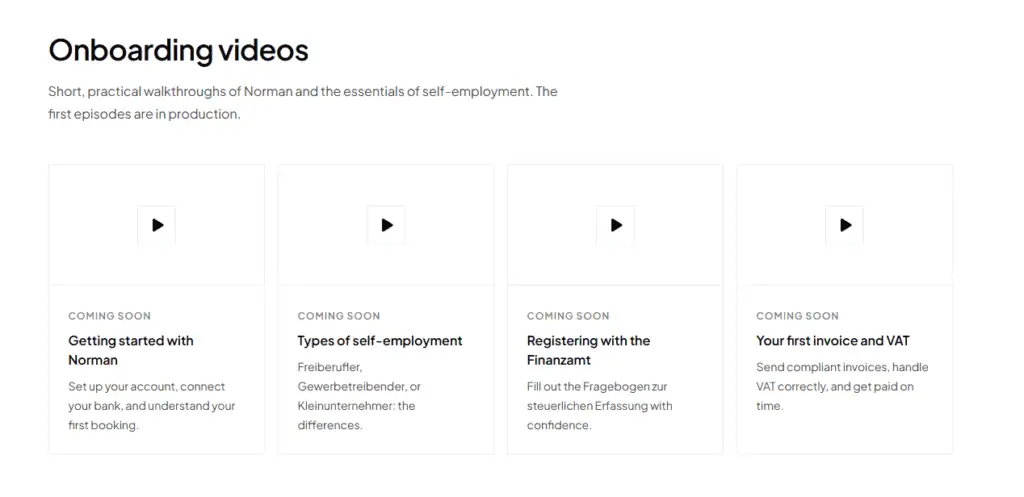
With that said, we give Norman a score of 9 out of 10 for onboarding. Setup is guided and adapts to what you’re trying to do. However, Norman does not offer onboarding videos yet. This is what led to the deduction of 1 point.
Account setup (10/10)
- No credit card is required to create an account.
- The free plan offers double-entry bookkeeping and unlimited invoicing. Other accounting software only offers 14 to 30 days of free access.
Onboarding (10/10)
- Signup opens by asking what you’re trying to do. That includes accounting and taxes, invoicing, self-employment registration, or an employee tax return. The flow adapts to that choice.

- You can skip the steps and finish them later.
- Norman has four onboarding videos. However, all of them are still marked “coming soon,” so we’re not crediting points for them yet.
Personal support (10/10)
- Norman offers a free personal onboarding call through a “Book a call” option in the sidebar.
- Norman hosts free live onboarding sessions every two weeks. These are available in German and in English.
- A support chat in the sidebar answers simple questions 24×7. For harder questions, a human agent joins the conversation. The follow-up was within a few hours.
- A separate AI assistant on the Home page works more like ChatGPT. You can use it to get insights about your business. It offers slash commands for running common tasks.
- Both the Home page assistant and the sidebar support chat keep a history you can revisit.
Moving data from your previous accounting software to Norman (10/10)
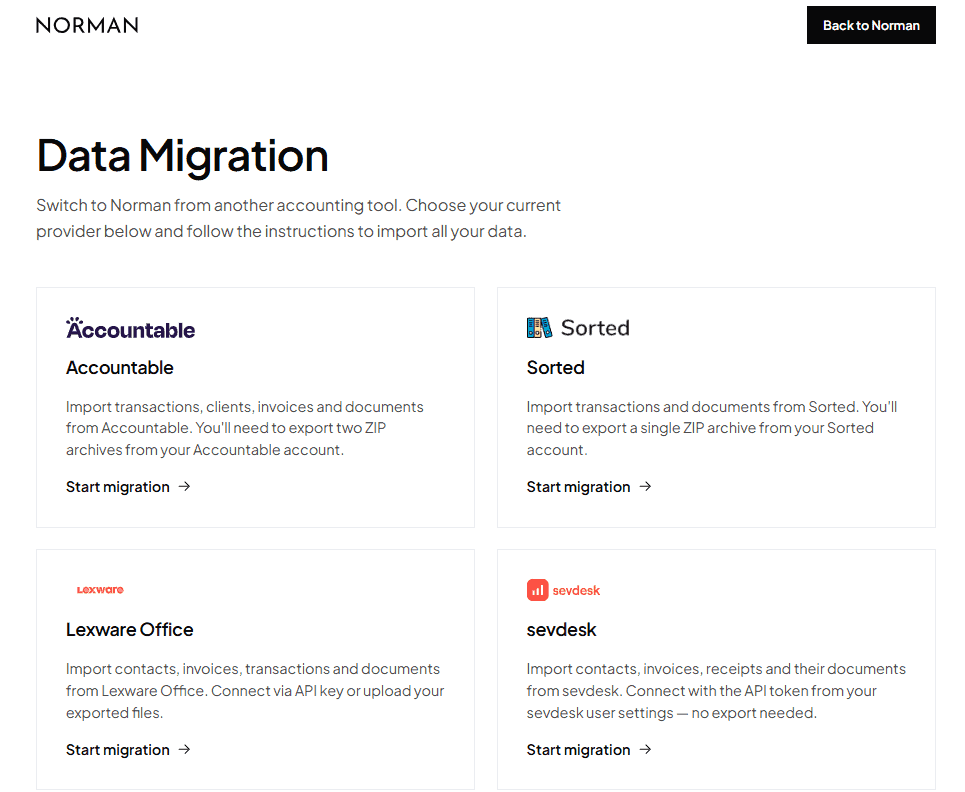
Norman offers a dedicated migration portal for the most popular accounting software. This makes data migration very easy.
How good is Norman’s user interface?
We give Norman a score of 6 out of 10 for its user interface. Norman offers a modern and easy-to-use interface.
However, it still lags behind the user interface offered by Accountable*. Of all the accounting software we have reviewed so far, Accountable has the best user interface.
Here is what we like about Norman’s interface
- The Home screen greets you conversationally. It shows shortcuts to create an invoice, submit a tax declaration, or upload a document.
- AI is well-integrated across different functions. A “Smart Prompts” panel triggered by a slash command suggests ready-made queries.
- A “Get started” checklist tracks setup progress and allows you to jump straight to that task.
- A dedicated Amortization tab tracks fixed assets by purchase price, depreciation period, and amount still to be written off.
- An Insights tab presents revenue, costs, and profit in a clean month-over-month table.
What we don’t like about Norman’s interface
- Norman Finance’s interface uses bookkeeping terminology. This makes it easier to use for people who already understand basic accounting concepts, but beginners may find it confusing.
Learn the bookkeeping basics here ->
- The interface has only two colors: black and white. It’s subjective, but we would prefer if Norman adds some color elements to the application.
- No analytics or charts.
- No dedicated page to track all your expenses.
- We also find some features like “mapping an invoice to a transaction” confusing to use.
In short, Norman should focus on improving its UX to take things to the next level.
Start a Business in Germany with Confidence – eBook

- Learn the complete lifecycle of a self-employed person in Germany.
- From business registration and bookkeeping to taxes and fundraising, plus free tools to scale your business.
- Tips and strategies for new founders
- Save money, time, and stress by knowing the steps to set up a business in Germany.
Does Norman offer English support?
Yes, Norman offers English support. This is why it receives full points in this category.
Norman’s landing page, AI assistants, and webinars are all available in English alongside German.
What accounting features does Norman offer?
We give Norman a score of 7 out of 10 for core accounting features.
Invoicing (10/10)
Norman supports e-invoice (XRechnung, ZUGFeRD) and PDF invoice formats. E-invoicing is mandatory for business-to-business sales in Germany. The mandate started phasing in during 2025.
- Invoices created by Norman carry a QR code with payment data.
- Paid tiers include automatic dunning reminders for unpaid invoices.
- Quotes and cancellation invoices are included even on the free plan. Recurring invoices require the Klein tier or higher.
- Sending an invoice by email is available on the free plan. It also offers a direct e-invoice download.
- The invoice template supports customization. This includes changes in logo, accent color, invoice language, and currency.
Expense tracking (5/10)
Expense tracking is disappointing in Norman Finance.
- You can upload an invoice or receipt in Norman. However, the AI-suggested transaction matches are not accurate.
- Norman doesn’t have a dedicated page where you can see all expenses, what you are spending the most on, and expense analytics.
- We find creating a transaction from the uploaded invoice confusing. There are two places you can edit. We are unsure if the two edits are synced or are separate.
- Below the invoice, the data is extracted by AI.
- In the Create Transaction tab.
- All your documents (income and expenses) are categorized in the <Month Year> folders, which is nice. However, it would have been nicer if the user could also view all the documents in tabular form on one screen.
Other accounting features (8/10)
- Norman offers double-entry bookkeeping, even on the free plan. This is the bookkeeping method companies (UG, GmbH, AG, etc.) are legally required to use.
- One feature we like a lot is automated payment to your vendors. Simply forward the invoice or upload it. Norman will automatically create a bank transfer for your approval.
- You can generate BWA reports and export them for your tax advisor.
- You can also request sign-off on your tax reports from one of Norman’s partner tax advisors directly from the app.
- Tax Autopilot, still in beta, prepares your VAT return for you to approve before filing.
What is VAT in Germany and why founders must know about it ->
- Bank connections run through a licensed provider rather than Norman itself, so Norman never sees your banking login. See our guide to the best business bank accounts in Germany.
We deducted 2 points because Norman doesn’t offer any analytics or charts, and some features can be harder to understand.
What advanced features does Norman accounting software offer?
We give Norman a score of 8 out of 10 for advanced features.
- AI tool connections. Norman connects to outside AI tools like ChatGPT, Claude, and Cursor. This lets you use it through your favorite AI tool. You can do everything via Claude or ChatGPT that you can do via Norman’s user interface.
- Receipt forwarding. Forward receipts and invoices to a dedicated Gmail address or Telegram bot, and Norman extracts the amount, date, and vendor automatically. The same feature for WhatsApp and Slack is coming soon.
- Automation rules. With the rules feature, you can build conditional automation, for example categorizing every transaction where the description contains a given text.
- Business integrations. Norman connects directly to Stripe, Shopify, and DATEV.
- Auto payment: Just upload an invoice that you need to pay. Norman will create a bank transfer automatically for your approval.
We deducted 2 points for the following reasons.
- Norman doesn’t offer integration with Amazon and eBay yet.
- Norman doesn’t offer project and cost-center management.
- You cannot assign an expense to a team member for review before it’s paid.
These features are only relevant for bigger teams and companies. If you are a freelancer or solo-founder, you won’t use these features anyway.
How much does Norman accounting software cost?
We gave Norman a 10 out of 10 for its pricing.
No accounting software in the market offers such a generous free plan. Moreover, Norman offers free company registration, free tax documents analysis, and more.
Norman offers three self-employed plans and three company plans. This is how much you pay for a yearly subscription.
Self-employed:
- Free: €0/month. Unlimited e-invoicing, tax write-off tips, bank sync, AI Autopilot, and connectors for ChatGPT and Claude.
- Klein: €9/month, for Kleinunternehmer. Annual EÜR, personal income tax, salary declaration as an employee, and the Invoicing Pro plan.
- Pro: €21/month, for self-employed people charging VAT. VAT returns, all tax declarations, a tax efficiency score, receipt auto-matching, and the Invoicing Pro plan.
Companies (UGs & GmbHs):
- Free: €0/month. Double-entry bookkeeping, AI Autopilot, unlimited e-invoicing, one connected bank account, and receipt capture.
- Pro: €9/month. BWA and financial reports, AI tax insights, DATEV export, tax advisor access, and the Invoicing Pro plan.
- Max: €39/month. UStVA and ZM filing, annual USt and GewSt filings, multi-user access, five connected bank accounts, and unlimited Norman AI.
GermanPedia
8.2 out of 10
Norman.Finance
08/2026
✅ Smart AI chat support
✅ E-invoicing (XRechnung, ZUGFeRD)
✅ Connects to ChatGPT, Claude, and Cursor
✅ Generoud free plan, no credit card required
How do customers rate Norman?
Norman holds a 4.3 rating from 11 reviews on Trustpilot.
Ten reviewers gave a perfect 5. One recent reviewer gave a 4. Trustpilot weighs recent reviews more heavily than older ones, which is why the overall score sits at 4.3.
Norman is still a young company. We could not find reviews on other reputable platforms, such as OMR and ProvenExpert.
Conclusion
We are amazed at how far Norman has come in a short period of one year. They have built tons of features and offer a generous free plan.
Anyone looking for free accounting software should consider Norman. You may have a small learning curve, but you can manage it by attending one of their live sessions or booking a personal call.
If Norman can upgrade their UX, it would be the best accounting software for expats in Germany.
More topics
- Different legal forms you can choose when starting a business in Germany
- How do you choose the right legal form for your new business?
- How to register your business in Germany?
- Chamber of Industry and Commerce (IHK) Explained
- The Chamber of Crafts (Handwerkskammer) [HWK]
- How to fill Fragebogen zur steuerlichen Erfassung?
- How to save taxes in Germany?
- Change tax class
- Myths about filing a tax return in Germany
- Capital gains tax in Germany
- Types of taxes you pay in Germany
- How much money does the German government collect in the form of taxes?
- Is filing a voluntary tax return worth it?